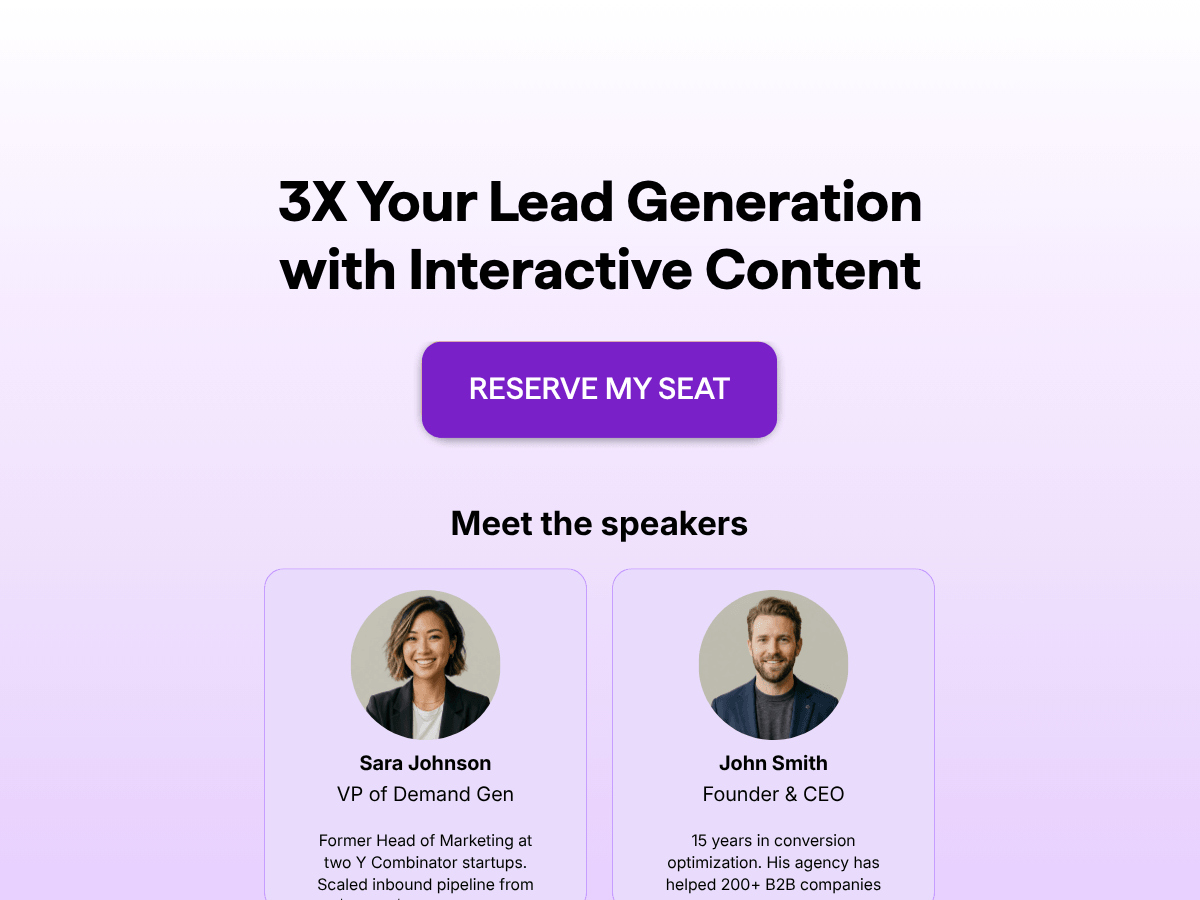
Template Overview
A webinar landing page is the registration funnel attendees see before a live training, masterclass, demo, or evergreen replay. This template gives you the full structure on one scrollable page: hero with date and duration, agenda, speaker bios, social proof, testimonials, and the registration form, all wired to fire confirmation emails the moment someone signs up.
The funnel ships with two pages: the long-form landing page that pitches the session, and a thank-you page that confirms the seat.
Use it to promote a one-off live webinar, a recurring training series, or an evergreen replay funnel. Swap the speaker photos, agenda, and testimonials for your own, connect your CRM or email tool through the Connect tab, and the registrations flow straight into your follow-up sequences.
Key Features
Hero with date, time, and duration stats. Three-stat counter pulls attention to when the session is, how long it runs, and what timezone, so visitors decide to register without scrolling.
Speaker section with photos and bios. Two-column layout with headshots, role, and a short credibility paragraph for each speaker. Add more presenters or trim to a solo host.
Session agenda with topic breakdown. A timed minute-by-minute breakdown of what attendees will cover, formatted to scan quickly. Edit the time blocks and headings to match your run-of-show.
Built-in registration form with required-field logic. First name, last name, email, organization, and job title fields capture qualifying data. Required fields trigger the conditional jump to the thank-you page.
Social proof stats and testimonials. Counter block surfaces past-attendee numbers and ratings; testimonial cards quote previous registrants with role and headshot. Both are editable per campaign.
Benefits
Captures registrations and the data behind them. Job title and organization fields qualify each registrant so the segments you build in your ESP actually match your ICP.
Sends confirmation emails automatically. Built-in email automation (to set yourself up) fires the confirmation the moment someone registers, with no third-party tool needed and no manual export.
Cuts attendee drop-off with reminders. Schedule reminder emails 24 hours and one hour before the event to lift show-up rates from the same funnel that captured the sign-up.
Blocks junk submissions before they hit your CRM. Required fields, terms consent, and validation on the email keep test entries and bot signups out of the registrant list. You can also set up OTP verification (phone and email), block disposable emails, and force business emails.
Pushes registrants into the tools you already use. 50+ native integrations plus Zapier and Webhooks send each registration to HubSpot, Salesforce, ActiveCampaign, Mailchimp, your calendar, your webinar platform, or any combination.
Frequently Asked Questions
-
A webinar landing page is a single-purpose page built to convert visitors into registrants for a live or recorded event. It explains what the session covers, who is speaking, when it runs, and includes a registration form that captures contact details and triggers a confirmation email.
-
A registration form collects contact details. A webinar landing page sells the event first: hero, agenda, speakers, social proof, and the form. This template combines both in one funnel, with the form sitting below the pitch and a conditional logic jump that skips a second confirmation step for fully completed submissions.
-
Yes. With the built-in email automation, you can trigger a confirmation the moment a registration is submitted. You can schedule additional reminder emails before the session and a follow-up after it ends, all from the same funnel that captured the registration.
-
Yes. The Connect tab supports 50+ native integrations plus Zapier and Webhooks. Send registrations into HubSpot, Salesforce, ActiveCampaign, Mailchimp, Zoho, your calendar tool, your webinar host, or any combination you need.
-
A/B testing is a native feature. Create a variant of the funnel, publish both, and the platform splits traffic between them automatically. The analytics dashboard reports per-variant conversion so you can pick the winner without external split-testing tools.
-
Yes. Add answer-based or score-based outcome logic to ask one or two qualifying questions before the registration block. Route different segments to different thank-you messages, different confirmation emails, or different sales follow-ups.
-
Yes. Add a payment block and connect Stripe, PayPal, or Square in the Connect tab. Stripe alone handles cards, EPS, iDEAL, and SEPA Direct Debit for paid registrations across Europe.
-
Yes. You can publish is as a standalone page on your own domain. You can also embed as an inline block in your existing site, load as a popup or slider triggered by scroll or exit-intent, or share the direct link in ads, emails, and social posts. Alternatively, you can quickly publish it as a hosted page on involve.me.
-
The default fields are first name, last name, email, organization, and job title. You can add (many options available) or remove fields, mark any as required, and trigger different confirmation flows based on what the registrant submits.
-
involve.me is SOC 2 Type 2 certified and GDPR-compliant. The template ships with a terms consent checkbox and a separate newsletter opt-in checkbox, so the legal basis for both the event communication and the marketing follow-up is recorded per registrant.
-
It depends on your customization needs. But most users launch in about an hour: swap the event details, speakers, and copy, set the automated email workflows (or connect the email tool), then publish. The AI Agent can draft the agenda and FAQ copy in seconds from a short brief.
-
The free plan allows you to run 2 live funnels, and accepts 50 submissions or 500 visits per month - Ideal for a small webinar. Paid plans start at $29/month, lifting those limits and bringing many premium features, email automation, and additional integrations.


